



5 UX design principles that improve service usability and support business growth
Have you ever travelled to a foreign country and discovered after landing that none of the signs are in a language you understand? There are no clear indications of where to go. You are tired from the flight, looking for a train or bus stop, but even buying a ticket feels more complicated than planning the holiday itself.
Good UX (user experience) is the opposite: simple, smooth, and accessible to everyone. The user can complete their journey smoothly, even on their first visit, because everything is logically structured and clearly guided. It is like a well-functioning system: you do not have to think about every step, you simply reach your destination with ease.
Why is good UX important for business, and what actions help take a company’s user experience to the next level?
In this article, we discuss how user experience design and accessibility help increase business value. These are the topics we work with daily at Trinidad Wiseman, creating user-friendly and commercially viable solutions. On our website, you can explore our design and accessibility projects. Contact us if you would like to exchange ideas.
Why is good UX good for business?
More customers who complete a purchase.
A good user experience makes a product more efficient and easier to use, while reducing the time needed to complete tasks. For example, offering a “buy as a guest” option in an online shop can increase completed purchases by several tens of per cent.
Good UX also helps resolve situations where business goals and user goals do not initially align. In these cases, the user’s primary goal must come first.
While user identification is important for the company, it can take place later, for example after a purchase or once a value has been created. When users can complete tasks quickly and without friction, both conversion rates and their willingness to identify themselves later increase.
Clear return on investment (ROI).
Improving user experience is not a cost but an investment. Clear and simple products reduce the need for customer support, increase sales, and improve overall customer satisfaction.
A stronger brand and greater loyalty.
A good user experience builds trust and a sense of security. When a service is convenient to use, customers feel more connected to the brand and recommend it to others. This turns customers into brand advocates.
Competitive advantages through better service.
Users like services that are easy to understand and smooth to use. A good user experience means the product fixes problems that competitors didn’t notice, therefore offering better products than the others.
Easier daily work and reduced workload.
Well-designed user journeys reduce the burden on employees. Customers can complete more tasks independently and contact customer support less frequently.
How to achieve a better UX?
1. Understand users and their needs.
Start by answering the basic questions: who are your users, and what do they actually need?
- Collect feedback on existing products or services through interviews and surveys.
- Map user journeys and identify pain points.
- Use statistical data such as web analytics and heatmaps to understand user behaviour, preferences, and patterns.
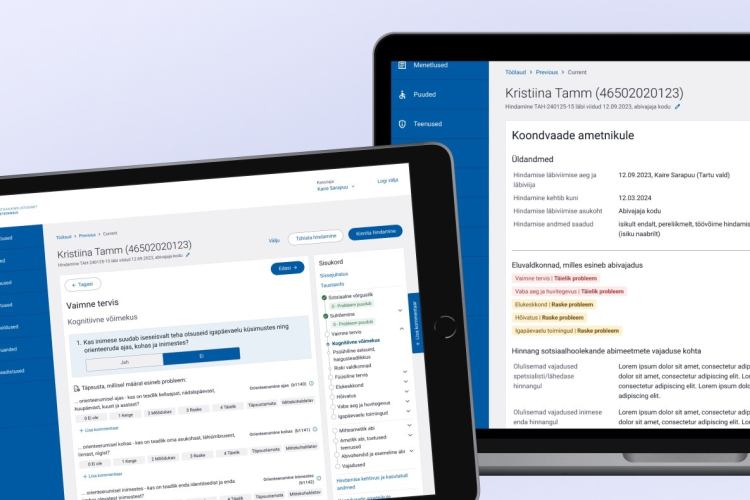
At Trinidad Wiseman, in cooperation with the Estonian Health Insurance Fund, we helped create a service based on the real needs of healthcare professionals. Research showed that family doctors had to gather patient information from several different systems, which made their work time-consuming. It was also not possible to modify or add any new data.
The new service allows healthcare specialists to view a patient’s health history in one place, update medication schedules, document appointments, and perform other treatment-related tasks. As a result, less time is spent on the computer and more time with the patient.
2. Make the service accessible to everyone.
Good UX is not only about usability or visual appeal. A service or product must be accessible to all users, regardless of age, special needs, or cultural or educational background.
Where to start:
- Check colour contrast, readability, and text resizing. Low contrast and small text make content difficult to read. Many users are colour-blind, so important information must not rely on colour alone. If you would like a deeper understanding of how colour contrast, colour vision deficiency, and WCAG requirements intersect in web design, we recommend reading our article “Web accessibility: a colourful world”.
- Ensure developers include the necessary labels and alternative text for screen readers. Visually impaired users rely on screen readers, and missing descriptions for buttons, links, or images make content inaccessible.
- Enable full keyboard navigation. Many users with mobility or visual impairments cannot use a mouse, and proper keyboard support significantly improves accessibility.
Bolt previously used a light green brand colour that lacked sufficient contrast on a white background. At Trinidad Wiseman, we conducted an accessibility audit and recommended improving contrast by darkening either the background or the text. Bolt chose to darken its brand green, making text and logos more visible and the brand more accessible to all users.

3. Test solutions and collect feedback continuously.
One of the most important UX activities is testing designs with both existing and new users. Testing helps identify problem areas, improve solutions, and refine user journeys.
Where to start:
- Create design prototypes and test them with users. Figma allows you to build realistic prototypes that closely resemble finished products. AI-based tools such as Figma Make, UX Pilot, Uizard, Lovable, and similar solutions also speed up prototyping, making ideas testable even when budgets are limited.
- Collect feedback continuously and observe what users do, using web analytics, feedback forms, surveys, or short evaluations.
- Run A/B tests to determine which solution works better, for example whether a button or notification is more noticeable in the top right corner or elsewhere.
The journey for joining an Elisa service worked technically but was not smooth from a user perspective. In cooperation with Elisa, Trinidad Wiseman conducted user testing that revealed several confusing and time-consuming steps, leading some users to abandon the process. Insights from testing helped identify bottlenecks and improve the journey, significantly increasing the number of completed subscriptions.
4. Keep the interface fast and reliable.
If a website or app crashes or loads slowly, users will stop using it. Speed and reliability are just as important as clarity and ease of use.
Where to start:
- Optimise page and app loading times.
- If technical issues cause delays, inform users clearly and provide guidance on what to do next.
- Design logical and transparent user journeys that create a sense of security. For example, in multi-step payment flows, clearly showing completed and upcoming steps increases the likelihood of completion.
- Ensure the service works well on mobile phones and tablets, not only on desktop devices.
In cooperation with the Estonian Traffic Insurance Fund, we developed a web application that replaces the paper-based “yellow sheet” used to record nearly half of all traffic accidents in Estonia. The service must remain stable even during unexpected usage peaks, so we implemented an architecture that allows the server to automatically add resources as demand increases, ensuring a smooth user experience.
The application is web-based and works on any device without installation. Information can be entered simultaneously on multiple devices and shared with insurers via e-state data exchange, reducing paperwork errors and speeding up data flow.
5. Create emotion and build trust.
Good UX is not only about functionality. The emotions users experience while using a service are equally important. Positive feelings and a clear sense of reliability increase trust and encourage users to return.
Where to start:
- Use micro-animations and clear, friendly error messages to reduce frustration.
- Be transparent about how user data is protected and privacy is ensured.
- Add thoughtful details such as illustrations, thank-you messages, and helpful explanations.
SK ID Solutions is known for secure digital signing services such as Smart-ID, Mobile-ID, and e-seal. When designing the new self-service environment, Trinidad Wiseman’s designers followed the company’s identity and core values: reliability, security, and innovation.
The interface uses illustrations and shapes that symbolise security, including padlocks, shields, and repeating patterns inspired by banknote security features. Customer support contact details were made easy to find, ensuring users feel confident that help is always available. You can also read our earlier article about the SK ID Solutions project.
Summary
A good user experience (UX) is not just a design concern; it creates direct business value. A convenient, accessible, and well-designed service attracts more customers, increases loyalty, and simplifies an organisation’s day-to-day operations.
Improving user experience is part of a longer journey in which an organisation’s UX maturity develops step by step. If you want to understand how to build UX systematically at an organisational level, we also recommend reading our article “Climbing the UX maturity ladder together with users”.